With Windows Vista Service comes a very handy tool which is called VSP1CLN.EXE, short for Vista Service Pack 1 Cleaner. The tool can be found in %SYSTEMROOT%\System32 and when run it makes Windows Vista Service Pack 1 permanent on your computer. In short that means that all files that are backed up during SP1 installation are removed and you will gain several gigabytes of disk space. It also means that you cannot uninstall Service Pack 1 after you have run VSP1CLN.EXE. This tool should pass anyone by!
Month: February 2008
Script for enabling Network discovery and File and Printer sharing in Vista
In Windows Vista it might at a first glance appear to be tricky to automatically enable File and Printer sharing and Network discovery. However it is actually very easy when you know what to type. The “netsh” command comes in handy here, and you can use the below strings in a script to enable it on many clients automatically.
To enable File and Printer sharing you run the command:
netsh firewall set service type=fileandprint mode=enable profile=all
To enable Network discovery you run the command:
netsh advfirewall firewall set rule group=”network discovery” new enable=yes
Please note that you can change which profile you want to apply the changes for.
EDIT: First and foremost, I accidently added the “profile=all” to the Network Discovery string which is totally incorrect, as Network discovery is enabled for all profiles when this command is run. Second, if you are using Windows in another language than English you will have to adjust “network discovery” to what it is called in your localized language. For instance on the Swedish version of Vista it would be:
netsh advfirewall firewall set rule group=”nätverksidentifiering” new enable=yes
EDIT 2: The network discovery script only work with Windows Vista with Service Pack 1.
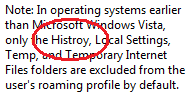
Spelling error in Vista with SP1 RTM: Histroy instead of History
For the first time ever I have found an English spelling error in a final Microsoft product. I noticed it today while reading the explanatory text for the policy setting “Exclude directories in roaming profiles” under User configuration > Administrative templates > System > User profiles. And yes, I am running Vista with Service Pack 1 RTM.