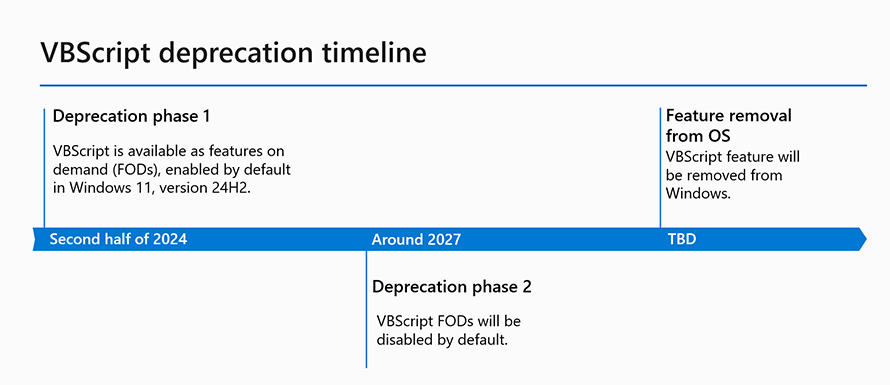
A few years ago, Microsoft announced that VBScripts (VBS files) are deprecated and will eventually be removed from Windows step-by-step over time. That means if you are using VBScripts on your Windows devices, now is the time to start getting rid of them.
The background
Simple, Microsoft have outlined the future both in VBScript deprecation: Timelines and next steps | Windows IT Pro Blog but also Deprecated features in the Windows client | Microsoft Learn.
The inventorying of your current situation – how big is your challenge?
I would like to highlight two options to understand your current situation. If you are already on a cloud-native Windows client platform the risk of having VBScripts in your environment is less likely than if you have a classic on-prem or hybrid environment. Nevertheless, and regardless of what scenario you have, applications might contain VBScripts so you better check how you are impacted anyhow.
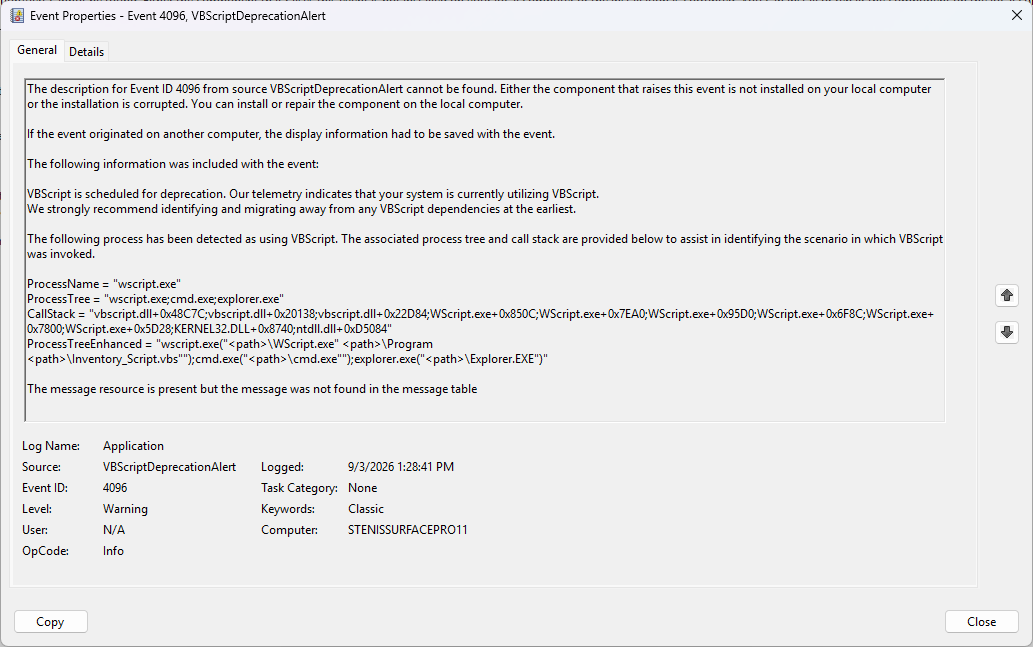
Windows event log: ID 4096 – VBScriptDeprecationAlert
In Windows there are nowadays events logged whenever a VBScript is executed. This is found in Event Viewer in the Application log. If you have central collection of event logs in place, you can potentially use that to get a broader perspective. But there is a better option so keep on reading.
Defender for Endpoints and KQL at your service
Often forgotten when it comes to Windows device management is the Defender XDR portal (https://security.microsoft.com), if you are using Defender for Endpoint that is. When Defender for Endpoint is enabled on your Windows devices it reports everything that is executed on devices to the Defender XDR service, and thus the information is also possible to query.
Of course, you can use Advanced hunting and KQL queries to get the best and quickest result from ALL your devices in one query which is just awesome!
Summarize all VBScripts executed and how many times
With the query below you will see all unique scripts executed on all devices and how many times they have been executed.

DeviceProcessEvents
| where Timestamp > ago(2d)
| where FileName in~ ("wscript.exe", "cscript.exe")
| where ProcessCommandLine has ".vbs"
| extend VBScriptPath =
coalesce(
extract(@"""([^""]+\.vbs)""", 1, ProcessCommandLine),
extract(@"([A-Za-z]:\\\S+\.vbs)", 1, ProcessCommandLine)
)
| where isnotempty(VBScriptPath)
| summarize
Executions = count(),
Devices = dcount(DeviceName),
Users = dcount(InitiatingProcessAccountName),
FirstSeen = min(Timestamp),
LastSeen = max(Timestamp)
by VBScriptPath
| order by Executions descScripts on what devices and which users
To get the details, the query below lists all executions and include what devices they are executed on and what users execute the scripts.

DeviceProcessEvents
| where Timestamp > ago(4d)
| where FileName in~ ("wscript.exe", "cscript.exe")
| where ProcessCommandLine has ".vbs"
| extend VBScriptPath =
   coalesce(
       extract(@"""([^""]+\.vbs)""", 1, ProcessCommandLine),
       extract(@"([A-Za-z]:\\\S+\.vbs)", 1, ProcessCommandLine)
   )
| project
   Timestamp,
   DeviceName,
   InitiatingProcessAccountName,
   VBScriptPath,
   ProcessCommandLine
| order by Timestamp descThe hard part – Fixing the legacy
The easy part is understanding the current situation. The hard part is getting rid of the legacy VBScripts that you might have.
So now that you know what VBScripts are executed in your environment, now is the time to start smoking them out, basically fixing whatever they do and replacing them with more modern scripts or solutions.
Summary
VBScripts have already been deprecated for many years, and support is going away so do not wait to get rid of all the usage and start migrating away today.
You must be logged in to post a comment.